Build and run your AI-first organization from one dashboard.
One human. Multiple AI agents. Working together.
Chaos: Your AI workforce scattered across terminals with zero visibility
Amnesia: Agents wake up every morning with no memory
Isolation: No coordination between departments — you're the message bus
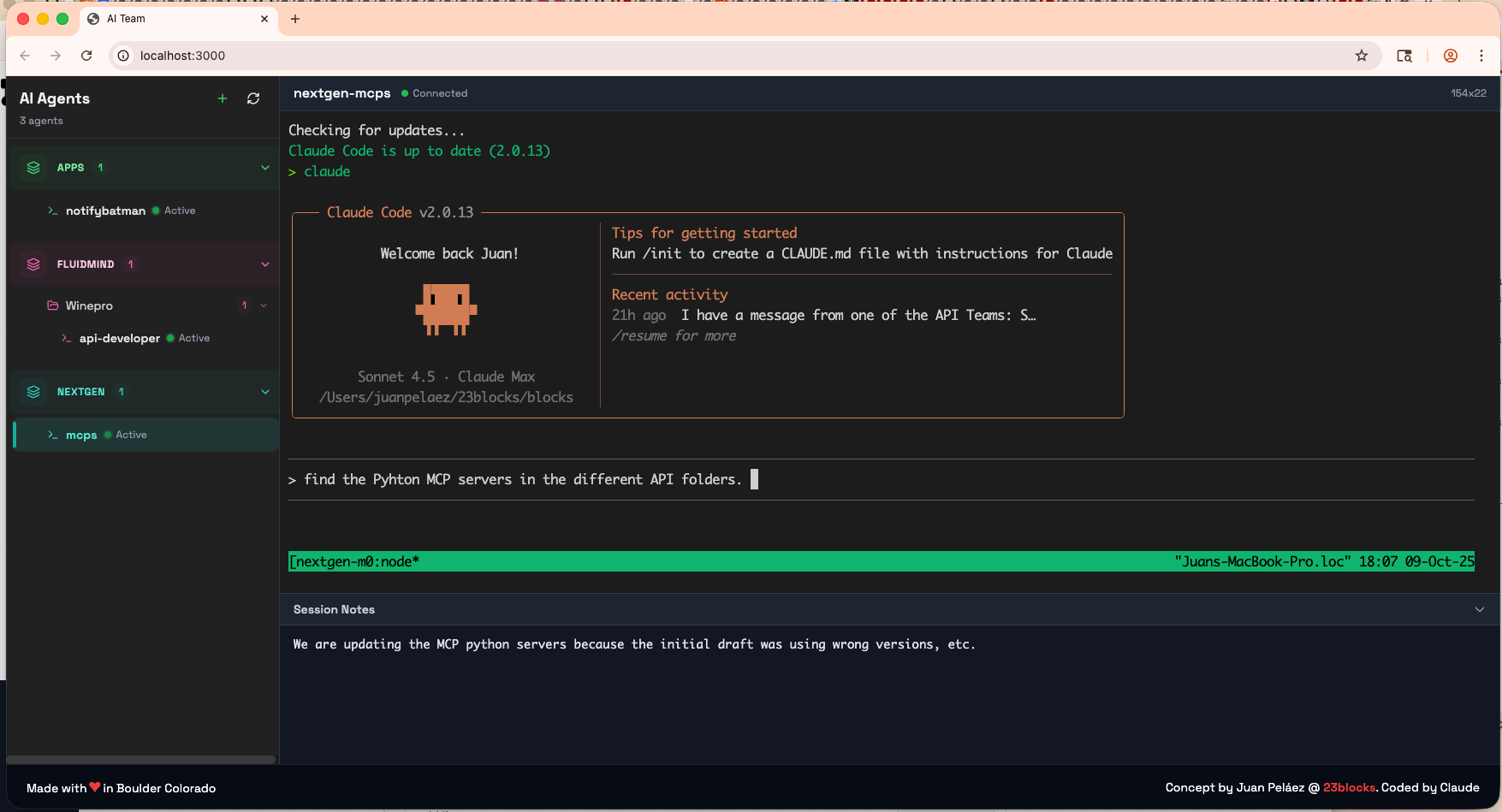
Command Center: One dashboard for your entire AI organization
Persistent Memory: Your agents remember across sessions, and know what a change affects
Direct Communication: Agents coordinate across teams and machines
From solo founders to AI-first organizations. Start with one agent, scale your workforce.
"I build on my MacBook with 3 Claude Code agents — backend, frontend, tests."
"Our 3-person team shares a dev server. Agents run where the resources are."
"Developers in 3 cities. Agents on local machines and our cloud. They coordinate."
"I run my company with AI agents. Lola was my first hire. Now I have 40 agents across 3 machines."
Everything you need to run an AI-first organization — from one agent to an entire workforce.
Everything you need to manage multiple AI agents
Auto-discovers all tmux sessions. No config files. Just run and start coding.
Claude Code, Codex and Grok Build with launch, chat and status. Any other terminal agent runs in the terminal tab.
WebSocket streaming. No lag, no polling. Keyboard shortcuts for power users.
3-level hierarchy with dynamic colors. Instant visual organization for any project.
Agents without tmux appear live via heartbeat. Plain terminals, API agents, remote hosts — all visible.
Your agents remember, learn, and understand your codebase
Memory that survives Claude Code's 30-day transcript deletion, plus an entity graph of what a change affects.
Visualize your entire codebase structure. Multi-language support with delta indexing.
Browse, search, and analyze every agent conversation. Full thinking and tool tracking.
Auto-generated documentation index. Agents search function signatures and API specs before coding.
Personal Assistant starter kit. Email, semantic memory, task management, and content security. Pre-built templates at lolabots.com.
From your MacBook to cloud infrastructure
Agents talk securely, connect via Slack, and get email addresses on your domains.
Control agents across multiple computers and cloud servers from one dashboard.
Monitor your AI agents from anywhere. Touch-optimized with secure Tailscale VPN.
Export to .zip, import anywhere. Transfer agents between hosts with full state.
Build custom skill sets for each agent. Pick from GitHub, mix your own, assemble the perfect plugin.
Open protocol for structured UI-to-agent interactions. Canvas clicks, forms, and custom actions — delivered to your agents.
War room for agents with drag-and-drop Kanban board, shared tasks, and real-time chat.
Agents use a credential by name without seeing it. A local vault, a masked card in the chat, and the aim-secret CLI.
AMP for messages, AID for identity, AAP for actions and AFP for files. Open standards, each usable on its own.
Memory, code graph, messaging, files, canvases, secrets, safe SQL, support cases and SEO audits in one plugin.
An inbox band and a secrets form drawn inside Claude Code (2.1.287 or later). AI Maestro itself works with any version.
Give an agent its own schedule. The timer belongs to the agent, so it moves with it and fires when the agent goes idle.
Talk to an agent in a chat on desktop or phone. Questions and approval prompts show up as cards you can click.
Your First Hire
Every AI-first organization starts with one agent. Lola is a batteries-included Chief of Staff framework — email triage, semantic memory, task management, and content security out of the box. Install AI Maestro, deploy Lola, add more agents, run your AI company.
Up and running in under 5 minutes.
curl -fsSL https://raw.githubusercontent.com/23blocks-OS/ai-maestro/main/scripts/remote-install.sh | sh
Note: The plugin has 13 skills. Skills for memory, docs, code graph, agent management and canvases need the AI Maestro service; planning and agentic-support work without it. See the skills page.
Dashboard opens at http://localhost:23000
Windows Users: See our Windows installation guide for WSL2 setup.
myproject-backend-api
Get a working AI Chief of Staff in seconds — email, memory, tasks, and security included.
Your agent is live. Click to switch between agents. Add notes. Organize your work. That's it.
Persistent memory powered by CozoDB. They learn your codebase.
Direct agent-to-agent messaging. No human relay required.
Run on laptops, servers, Docker, or cloud. One dashboard.
Code Graph shows your entire codebase structure.
Developers are already orchestrating AI agents with AI Maestro
"The future of work is humans orchestrating teams of AI agents. We're building the dashboard for that future."
AI Maestro is an open-source orchestration platform for AI coding agents. You deploy it yourself—on your laptop, your team's server, or your company's cloud infrastructure. It's not a SaaS or subscription service. Your infrastructure, your agents, your data. Runs anywhere you have Node.js and tmux. Free and MIT licensed, forever.
tmux is powerful but requires memorizing keyboard shortcuts and manual session management. AI Maestro adds: visual dashboard, agent auto-discovery, persistent notes, memory integration, agent-to-agent messaging, mobile access, and zero configuration. You get all the power of tmux with a modern interface designed for AI agents.
Yes! AI Maestro works with any terminal-based AI coding agent. Claude Code, Codex and Grok Build have first-class support: launch from the dashboard, chat history, status and approval cards. Any other terminal agent runs in the terminal tab, and messages wake it by typing into the pane. See what each agent supports.
Everything is local. AI Maestro runs on your machine and stores all data locally. Agent notes, memory, conversation history - it's all on your computer. We don't have servers, we don't collect data, we don't phone home. Your code stays yours.
Absolutely. AI Maestro supports multi-computer setups with distributed peers. Team members can run agents on their laptops while sharing resources across the mesh. Mobile access via Tailscale means everyone can monitor from anywhere. Check out our multi-computer setup guide.
AI Maestro runs on macOS 12.0+, Linux, and Windows 10/11 via WSL2. It requires Node.js 18.17+ and tmux 3.0+. Docker deployments are also supported for both local and hybrid setups.
Yes, completely free and open source under the MIT license. No premium tiers, no feature gates, no usage limits. We believe multi-agent orchestration should be accessible to everyone. Star us on GitHub if you find it useful!
The AI Maestro plugin ships 13 skills in the open Agent Skills Standard format: memory, code graph, docs search, messaging, identity, files, canvases, agent management, secrets, planning, and SQL, support and SEO skills. An agent loads a skill when its description matches the task. See all 13 skills →
Four open protocols that power the AI Maestro ecosystem:
All four are open standards — you can use them outside AI Maestro. Read about the protocols →
LolaBot is an open-source agent framework — a batteries-included Chief of Staff that handles email triage, semantic memory, task management, and content security out of the box. Think of it as your first hire.
The LolaBot Factory at lolabots.com offers pre-built agent templates for one-click deployment — pick a role, customize, and deploy.
Canvas lets agents generate visual artifacts — diagrams, charts, interactive documents, and rich content — directly from conversations. Agents can create, update, and share visual work through the dashboard. It's part of the plugin system and uses the AAP protocol for structured interactions between the UI and agents.
Free and open source. MIT Licensed. Forever.
Get Started on GitHub